Free Minecraft
Server Hosting
4 GB RAM, Always On.
Java Edition or Bedrock — your server is live in under 60 seconds. 4 GB RAM, 200% CPU, unlimited players, full mod and plugin support. No queue system, no idle shutdowns, no expiry. Ever.
FreeGameHost.xyz — Minecraft Hosting Stats
How We Compare to Other Free Hosts
Aternos, Minehut, and Falixnodes all offer "free" Minecraft hosting - here's what they don't tell you upfront.
Server Specs
Included Free.
No tiered plans on the free tier. Every Minecraft server gets the same allocation from day one.
Everything Included — Zero Cost.
Professional-grade tools on every free Minecraft server - no upsells, no feature gating.
Always-On - No Sleep Mode
Your server doesn't spin down when players leave. Anyone can connect at any hour with no cold-start wait - true 24/7 uptime with no queue system.
Full Mod & Plugin Support
Forge, Fabric, Spigot, Paper, Purpur - install anything you need via FTP. No curated marketplace restrictions, no whitelist, no extra charge.
Pterodactyl Control Panel
Industry-standard Pterodactyl panel - file manager, live console, environment variables, one-click version switching, all from your browser.
FTP & SFTP File Access
Push files with FileZilla, WinSCP, or any SFTP client. Full remote access at all times - upload entire modpacks in one go.
Automated Daily Backups
Daily automatic snapshots plus on-demand manual backups included. Restore your world in one click if anything goes wrong.
Unlimited Players
No slot caps from us - invite your whole community. Performance is limited only by your server's RAM, never by artificial limits we impose.
DDoS Protection Included
All servers sit behind Cloudflare for DDoS mitigation and low-latency routing across Europe and North America. No extra charge, always on.
Java 1.8 - 1.21+ Supported
Every major Java Edition version including the latest snapshots. Switch versions from the panel at any time without wiping your world.
The Pterodactyl Control Panel
Everything you need to manage your server - file manager, live console, startup config - all in your browser.
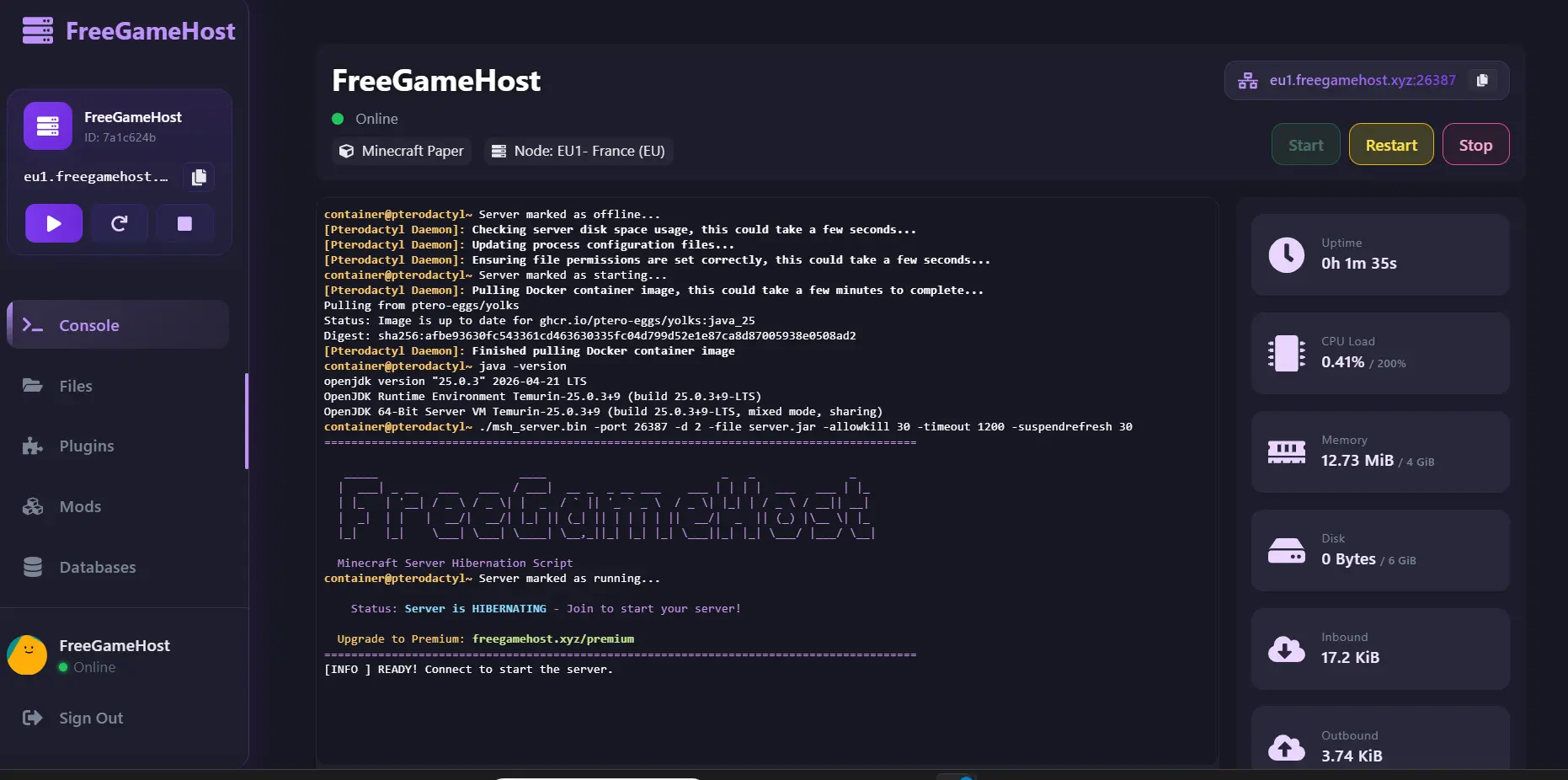
Live console output, one-click server restart, and drag-and-drop file manager - included free on every account.
Set Up Your Perfect Server
Whether you're running a vanilla survival world, a plugin-heavy SMP, or a full modpack, the Pterodactyl panel covers every use case. All server types are available from the same account - no separate sign-up needed.
Paper is the recommended type for plugin servers. It's fully compatible with every Bukkit/Spigot plugin and performs better than vanilla Spigot under load. For modpacks, use the Forge or Fabric type and upload the server pack via FTP.
Heavier modpacks with 200+ mods can push close to 4 GB on startup - trimming client-only mods (shaders, HUD mods) from the server pack usually resolves out-of-memory issues. Our Discord community has pinned guides for every major modpack.
Want a custom address for players? Set up an SRV record pointing to your server IP and port - our custom domain guide walks through the exact DNS values.
Setup Guides by Server Type
- Select Paper as your server type in the panel
- Choose your Minecraft version (1.20.4+ recommended)
- Accept the EULA in startup settings - server auto-configures on first boot
- Upload plugins to the
/pluginsfolder via FTP or file manager - Restart - plugins load automatically
- Download the server pack ZIP from CurseForge - not the client pack
- Note the Forge version number from the pack manifest
- Set server type to Forge and match the version in the panel
- Upload all extracted server files to root via FTP
- First boot installs Forge libraries automatically - takes ~2 minutes
- Select Fabric in the panel and choose your MC version
- Add Fabric API - required by almost all Fabric mods
- Upload mods to the
/modsfolder via FTP - Ensure you're using server-compatible builds (not client-only)
- Purchase a domain from Namecheap, Cloudflare, or similar
- Create an SRV record in DNS:
_minecraft._tcp.play.yourdomain.com - Point it to your server's IP and port from the panel
- Wait up to 24h for DNS propagation - then share your custom address
Up and Running in 3 Steps.
No server knowledge needed. From zero to multiplayer in under 60 seconds - completely free.
Create Your Account
Sign up at panel.freegamehost.xyz with just your email. No credit card, no subscription, no trial - your hosting starts immediately.
Configure Your Server
Pick your type - Java, Bedrock, Paper, Forge, or Fabric. Choose your version and install mods or plugins from the panel or upload via FTP.
Play With Friends - 24/7
Hit Start, share your server address, and you're in. Your server runs around the clock - no sleep mode, no spin-up delays, no player limits.
100+ Plugins & Mods — All Supported.
Full FTP access means you install anything - not just what a restricted marketplace allows.
Paper & Spigot Plugins - Bukkit Compatible
Forge & Fabric Mods - Popular Modpacks
Why FreeGameHost Over the Alternatives
Most "free" Minecraft hosting providers cut corners in one of three areas: RAM, uptime, or access. Aternos conserves infrastructure costs through its queue system - your server only runs when you start it, and shuts down the moment all players leave. Minehut caps RAM at 1 GB and limits you to 10 players on the free tier, making it impractical for anything beyond a small friend group.
FreeGameHost takes a different approach. We allocate a dedicated 4 GB of RAM and 200% CPU per server, backed by NVMe SSD storage, and keep it running around the clock. The platform is sustained by ethical advertising rather than by degrading the free product to push upgrades.
Compared to hosting Minecraft at home, you avoid dynamic IP headaches, port forwarding, and electricity costs. Compared to a paid VPS, you avoid monthly bills entirely.
If you want to run Forge or Fabric mods, full FTP access lets you upload any JAR file. Popular modpacks like RLCraft, Better Minecraft, and Vault Hunters all run on the free tier. Heavier packs with 200+ mods may benefit from our premium plan, but the majority of players never need to upgrade.
Every server runs on NVMe SSD storage - no spinning disks - so world load times stay fast. Servers are kept alive 24/7 with no sleep mode and no cold-start wait. Our guide to the best Minecraft server plugins and our custom domain setup guide cover the most common post-launch tasks.
Over 50,000+ servers have been created since launch, the majority running on the free allocation - that's not a trial stat, it's where people actually stay.
Common Questions — Straight Answers.
No marketing fluff, just honest answers about how the service works.
Start Your Free Minecraft Server
and Build Your Community
No credit card. No expiry. 4 GB RAM. Your server live in 60 seconds.